

Notifications
Clear all
FL Studio
1
Posts
1
Users
0
Reactions
707
Views

Topic starter
Hey guys, I wanted to showcase a visual explanation on how to count bars inside FL Studio with images. And, how the bars and beats actually work inside this Digital Audio Unit.
This is something I used to get very confused with and never quite understood the difference between 8 bars, 16 bars, 24 bars, 1 beats, 2 beats or 16 beats.
FL Studio has been designed with modifiable beats per bar, providing the music producer or beat makers overall control on the amount of input patterns within the bar.
I have made another topic on this, explaining how piano roll beat/bars can be modified - How to change the Piano Roll Grid inside FL Studio.
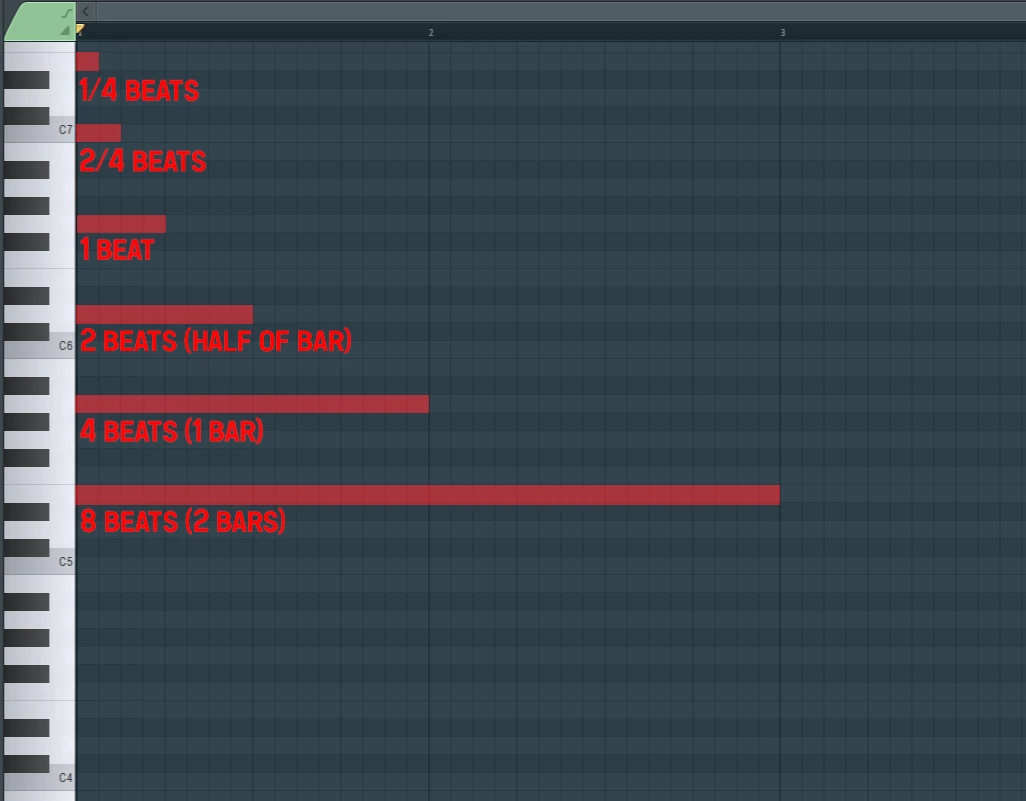
Now, I have managed to explain this as best as I could above, I have demonstrated:
- 1/4 beats (1/16 of 1 bar)
- 2/4 beats (2/16 of 1 bar)
- 1 beat (4/16 of a 1 bar)
- 2 beats (8/16 of 1 bar, or also known as half a bar)
- 4 beats (1 bar)
- 8 beats (2 bars)
This is my best and easiest visual and detailed explanation on how to count bars and beats within FL Studio.
I hope this diagram will help all FL Studio users looking for these details, if you guys have any questions drop them below, and I will do my best to help out.
This topic was modified 12 months ago by PAV - justproducer
Posted : 12/06/2025 4:53 pm
