

Notifications
Clear all
FL Studio
1
Posts
1
Users
0
Reactions
996
Views

Topic starter
Hey guys, I wanted to let many new and upcoming music producers who use FL studio be aware that the grid layout inside the piano roll can be changed.
This is usually by default set to 1/4 grid layout on a beat.
This layout will provide 4 different grids with inputs for 1 beat. Meaning, 4 different sounds can be played within the 1/4 beat rhythm, providing 16 beats per 1 bar.
I have explained beats and bars below:
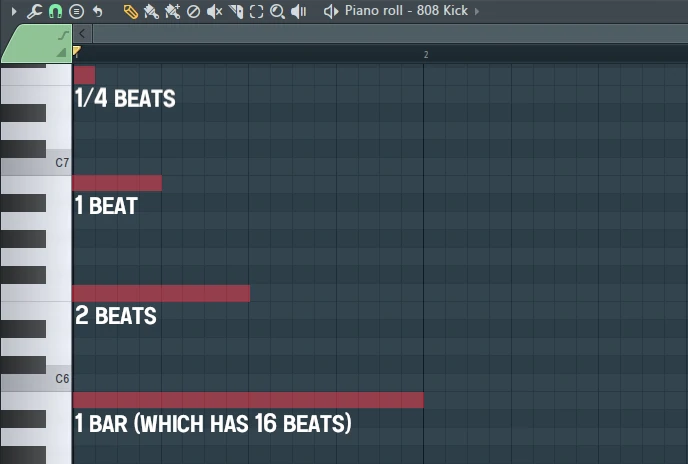
Now, inside FL Studio anyone can edit the settings of their piano roll to provide more or less beats sections per bar, this can come in handy when producing a more complex and active melodies.
To edit the beats and bars available inside the grid within the piano roll of FL Studio, this can easily be done by using the tools section within the piano roll.
Where to find the FL Studio piano roll grid settings?
This is located inside the settings menu bar within the piano roll, after you open the "piano roll" select the "tools menu" and then select any of the available grid layout options, shown below:

Within this section any music producer, beat maker or FL studio beginner user will be able to edit the grid layout to preferred length.
Examples of different sizes of piano roll grids shown below:

I wanted to make this quick guide to make all music producers and FL Studio users be aware that the piano roll comes with settings, and "YES" anyone can edit the piano grid to a preferable input style.
Hope this quick FL Studio tutorial will help out. If you have any question related to piano roll grid, drop them below within this topic.
Posted : 11/06/2025 9:37 pm
