

Notifications
Clear all
FL Studio
1
Posts
1
Users
0
Reactions
1,163
Views

Topic starter
FL Studio channel rack is a widely used feature inside FL Studio, many music producers are not aware that they can zoom in and out of the channel rack inside FL Studio.
This will provide more input patterns inside the channel rack. Now, usually the channel rack is set up with 2 bars which consist of 8 beats.
When anyone opens up FL Studio, this is the default zoom in size of the "channel rack", image shown below:
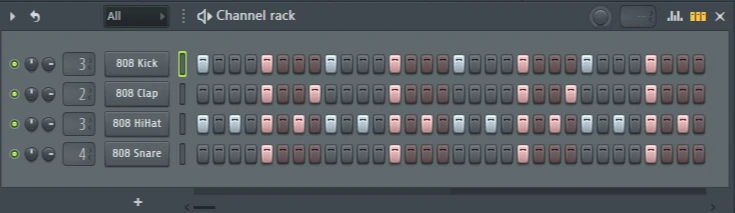
I am not sure if many people know this, but these 2 bars which are also 8 beats can be changed to 4 bars and 16 beats with a simple click and extrude function of the mouse.
This will provide more input for drum patterns within the FL Studio channel rack.
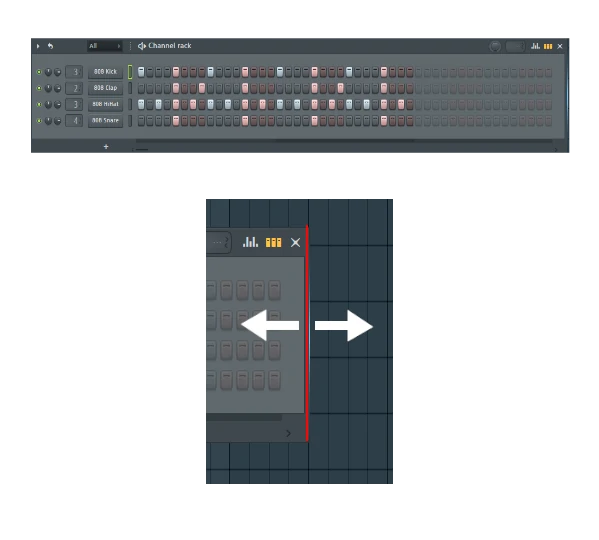
By clicking at the end of the "channel rack" you will be able to add extra input steps which can be used to create larger drum patterns and larger patterns overall.
How do you zoom in or out inside the channel rack?
- Click at the end of the channel rack inside FL Studio.
- Hold down the left mouse click button.
- Whist holding down the left mouse click button, drag to the left to zoom out, or drag to the right to zoom in and add extra pattern inputs.
- Then, simply let go of the left house button.
It's, as simple as that!

As you can see above, the channel rack has been zoomed out to 16 beats, which is 4 bars.
Now this will allow any music producer, or sound designer to input more steps within the "channel rack", I have demonstrated this in the image shown below:

I hope you guys have enjoyed my simple FL Studio tutorial on how to zoom in and out inside the "channel rack", this feature inside FL Studio is something which I never knew when I started producing music, so I wanted to share this with all upcoming music producers and sound designers.
If you guys have any questions on this, feel free to drop them below inside this topic.
Posted : 17/06/2025 9:22 am
