

Notifications
Clear all
Music Production Techniques
1
Posts
1
Users
0
Reactions
320
Views

Topic starter
Hey guys, its PAV here, I wanted to share my knowledge on best mixing technique on vocal recording from home studio.
I have been mixing and mastering vocal for over 4 to 5 years now, and I simply wish I knew about this 1 plugin earlier.
There is this free VST plugin which will provide high studio quality vocal recording, without any background noise or background hiss.
This is something which can also be used inside a professional studio for recording vocals.
Download: Bertom Denoiser
This VST plugin is able to remove any background noise and provide high studio quality recording settings for any live vocal recording.
I have been using this VST plugin for a couple of years now, on top of my effects stack for all vocal recordings.
These are the best settings for clean vocal recording, check out the image I have created below:
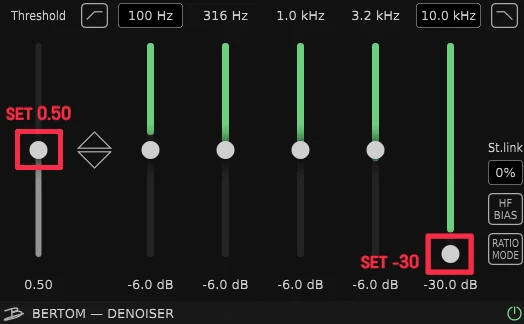
Once you get this VST plugin "Bertom Denoiser" which is free to download and open it up inside the DAW (digital audio unit). You will need to set:
- Threshold to 0.50
- 10.0 kHz to -30.0dB
If there is still noticeable background noise, you can alter the 3.2 kHz to -11dB all the way down to -30dB.
These settings will help anyone trying to record live vocals inside any music production software unit.
I hope that these settings will help many artists trying to achieve high quality vocal recording. When i first downloaded this software I simply had many doubts, but after trying it out I was simply "mind blown" this is most possibly one of the best free de-noise VST plugin out there!
Try it out and see how you get on.
Posted : 09/06/2025 11:17 am
