

Notifications
Clear all
FL Studio
1
Posts
1
Users
0
Reactions
263
Views

Topic starter
Hey guys I wanted to share some info with all the upcoming and new music producers to FL Studio, this is a feature which I never knew existed in FL Studio even after using FL Studio for over a decade.
In-fact, it took me like 4 or 5 years to figure this out that the Automation can be recorded separately inside a live input inside FL Studio.
So, which steps do you need to take in order to record "Automation" inside FL Studio.
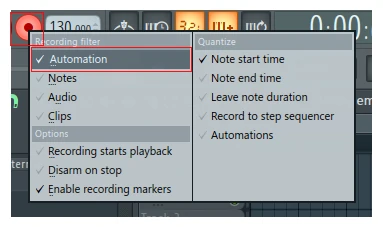
- Right mouse click on "record" button located at the top menu within FL Studio.
- Simply select "Automation" and make sure other settings are deselected.
- This will enable the automation to be recorded within a live input, including use of external hardware such as midi keyboard modulations and sliders.
- Click "record" when you're ready to record automation.
What could this FL Studio record automation technique be used for?
- For recording velocity automation on a live input.
- For recording panning effect automation on a live input.
- For recording pitch effect automation on live input.
- For recording release effect automation on a live input.
- For recording automation effect settings within the channel mixer.
This can also be used for cut-off, resonance, channel mixer volumes, recording mute and solo instances and list simply goes.
This feature works very well with EQ plugins, can be used inside EDM tracks to create this EQ swoosh rising sound.
I hope this feature will help you guys when it comes to recording an automation inside FL Studio.
If you have any questions, feel free to ask below, I will do my best to reply soon as possible.
This topic was modified 7 months ago 2 times by PAV - justproducer
Posted : 20/06/2025 5:45 pm
